Track Your EA Exam Progress Free: Coverage, Reviews Due and Weak Topics
How EA Dojo tracks Enrolled Agent study progress without an account, how a free password-free account saves it across devices, what the progress page shows, and how the opt-in monthly leaderboard and live study counter work.

Last reviewed: November 10, 2026. Describes progress, accounts and the leaderboard live on eadojo.org on that date.
Studying for the Enrolled Agent exam over several months is easier when you can see what you have covered and what is slipping. EA Dojo tracks your progress automatically, even without an account, and a free account keeps it in sync across your phone and computer.
For the exam itself and the steps to enrollment, see the IRS page Become an Enrolled Agent.
What the progress page shows
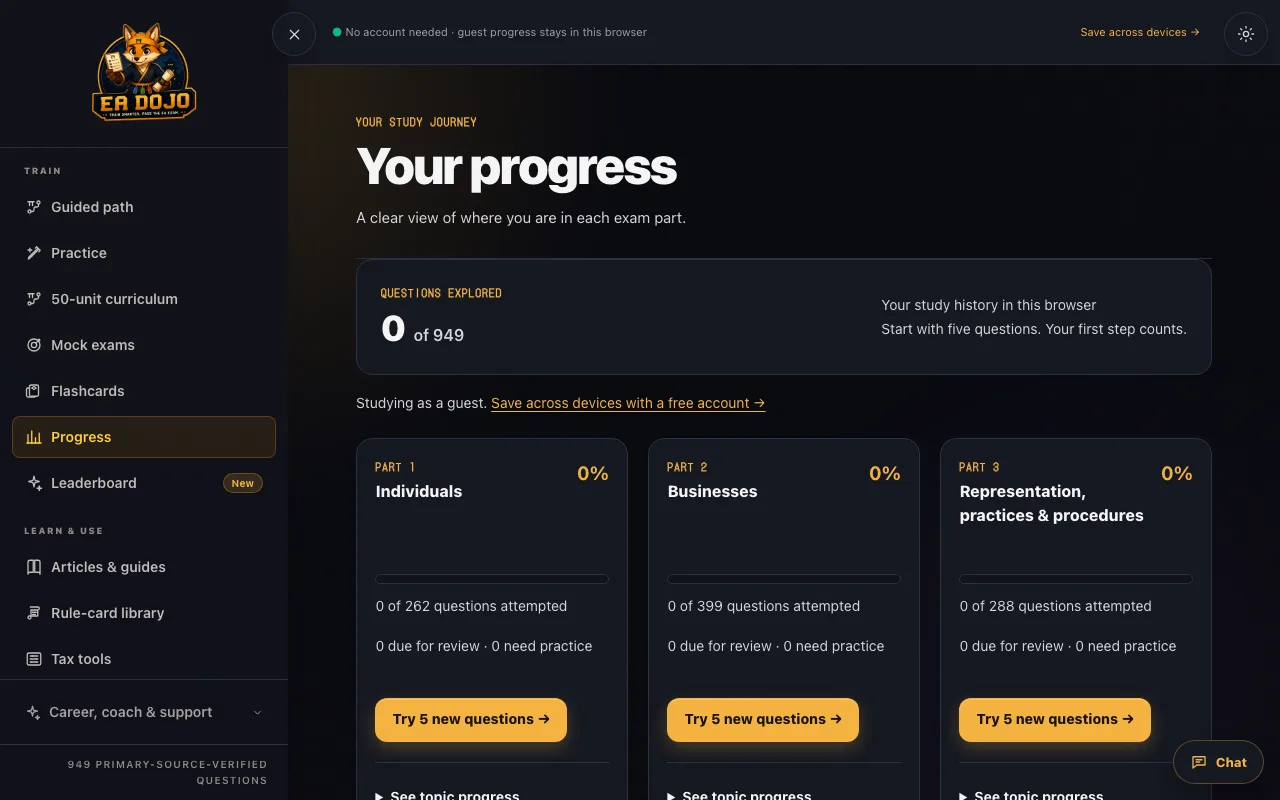
Open Progress to see:
- Questions explored, overall and for each part, with a bar for each.
- Due for review: questions scheduled to come back.
- Need practice: questions you have missed.
- A breakdown by topic, with a 5-question round for each.
Buttons start a Review due, Practice weak or Try new round. Coverage counts each question once, whether you met it in practice, self-graded flashcards or a submitted mock.
With or without an account
| Guest | Free account | |
|---|---|---|
| Progress saved | In this browser | Across devices |
| Sign-in | None | One-time email link, no password |
| Cost | Free | Free |
| Backup | Download a file | Download a file, restore saved history |
When you sign in for the first time, you can bring your guest progress with you. If two devices disagree, you choose which version to keep. The sign-in link works once and expires after 20 minutes.
The monthly leaderboard (optional)
The leaderboard ranks study each calendar month, using 80% accuracy and 20% active study time. It is opt-in: you need an account and must press Join the leaderboard, and you can leave at any time. You appear under a private, auto-generated alias; your name and email are never shown. To qualify, answer at least 20 different questions for the first time and study for at least 10 active minutes. Flashcards do not count, and diagnostic and mock answers count only once the round is submitted.
The "studying now" counter
The small counter at the top of each page shows how many people are studying right now, in the last 24 hours and in the last 7 days. It counts anonymous browsers, not accounts, and stores no names.
Example: a two-minute weekly check
- Open Progress on Sunday.
- Clear anything due for review.
- Pick the part with the lowest bar and start one Practice weak round.
- Open that part's next unit in the study path for the week.